CLI Reference
All commands are run from the agent binary. Release artifacts are ZIP archives named senhub-agent-<os>-<arch>.zip (e.g. senhub-agent-linux-amd64.zip, senhub-agent-windows-amd64.zip). Each ZIP contains a binary already named senhub-agent (Linux) or senhub-agent.exe (Windows) — no renaming needed after extraction. See the Installation guide for details.
Output conventions
CLI output is plain text with no decorative symbols. Data and command results are written to stdout, so a command can be piped or captured without post-processing. Diagnostic errors and warnings go to stderr, and a fatal error prints a single Error: <message> line to stderr before the process exits non-zero. Destructive commands (uninstall, refresh-unit, secret rm, license remove) prompt for confirmation before acting; each accepts a flag to skip the prompt for unattended runs (see the relevant sections below).
On Linux, commands that touch the service, the secret store or the binary run as root with the full path of the installed binary: sudo /usr/local/bin/senhub-agent <command>. On RHEL, AlmaLinux and Rocky Linux, the sudo search path leaves out /usr/local/bin, so sudo senhub-agent is not found there. The short senhub-agent form below stands for that full invocation; on Windows, run senhub-agent.exe from an elevated prompt.
Exit codes
Every command ends with one of four codes, so a script can branch without reading the text.
| Code | Meaning |
|---|---|
0 |
Done: the command did what was asked |
1 |
Warning: the command ran, but something needs attention |
2 |
Failure: the command could not do what was asked, including a malformed command line |
3 |
Unchanged: the machine was already in the requested state and nothing was written |
Which commands use which codes:
| Command | 1 Warning |
2 Failure |
3 Unchanged |
|---|---|---|---|
config check |
warnings only (no licence is not one: the free tier is reported as information) | an error (anything the agent itself refuses to load, such as no storage strategy, is an error), or a configuration that cannot be read | |
status |
service stopped, agent not answering, agent unhealthy, with a dead output or a probe in error | the service manager could not be queried | |
doctor |
at least one check is a warning | at least one check failed | |
config init |
invalid value, port in use, nothing written | configuration already present | |
config set |
unknown key, invalid value | the key already holds the value | |
install |
any error | service installed and enabled, unit as install writes it, configuration present, binary current |
Any other command exits 0 on success and 2 on failure. Before this contract, failures exited 1; a script that tests only for a non-zero code is unaffected, one that compares with 1 must now compare with 2.
install also takes --json (status, exit_code, changed, config_path, written); its progress text then goes to stderr. A service that is installed but whose unit drifted, or that no longer starts at boot, is not "unchanged": install rewrites the unit and enables the service, exits 0, and restarts nothing (restart the service to apply a changed unit). A unit owned by the .deb/.rpm package is never rewritten; the package manager updates it. On Windows the service registration and the single binary are the state.
A command that exits 3 has written nothing: no file is rewritten, and its modification time is unchanged. A script that provisions a machine can run config init, config set and install again and treat 0 and 3 as success.
JSON output
version, status, doctor, config check, config show, config set, config init and secret status accept --json. The command then prints a single JSON object on stdout and nothing else there; diagnostics still go to stderr. Without the flag the output is the text described below.
Every object starts with the same fields:
| Field | Type | Meaning |
|---|---|---|
schema |
string | Document identifier, senhub.cli.<command>/v1 |
ok |
boolean | false only when the command failed (exit code 2) |
status |
string | ok, warning, failure or unchanged, the name of the exit code |
exit_code |
integer | The exit code the process returns |
error |
string | The reason, present when ok is false |
A failure in JSON mode is still a JSON object, with ok set to false and error set, and the process still exits 2. The v1 suffix changes only when a field is removed or changes meaning; new fields can appear under v1.
| Schema | Fields after the common ones |
|---|---|
senhub.cli.version/v1 |
version, commit, build_time, go_version, environment, and service_binary (path, version, skew) when the systemd service runs another build |
senhub.cli.status/v1 |
service (state, manager_available, detail), source (daemon, local, minimal or none), notice, agent (health, connection, probes, performance and agent blocks, as the agent reports them), otlp with --otlp |
senhub.cli.doctor/v1 |
config_path, summary (ok, warn, fail, skip counts), checks (a list of section, id, level, message, fix) |
senhub.cli.config.check/v1 |
config_path, errors, warnings, findings (a list of level, one of ok, warn, error, off, and message) |
senhub.cli.config.show/v1 |
config_path, mode (redact, resolved or raw), config (the merged configuration as an object) |
senhub.cli.config.set/v1 |
key, value, config_path, file, changed |
senhub.cli.config.init/v1 |
config_path, changed, created, written (the files it wrote) |
senhub.cli.secret.status/v1 |
backend, store, secrets (a count; names and values never appear) |
config show --json applies the same redaction as the text view: secret values are masked unless --resolved is passed.
senhub-agent config check --json | jq '.findings[] | select(.level == "error")'
senhub-agent status --json | jq -r '.agent.health.status'
senhub-agent config set http.port 9080 --json; echo "exit $?"
Service Management
| Command | Description |
|---|---|
install |
Install as system service. On a machine where the service is already installed, the configuration is present and (Linux) the system binary is the one running, it changes nothing and exits 3 |
uninstall |
Remove the system service and delete the configuration directory, including the sealed secret store and the agent key. Irreversible; prompts first |
uninstall --yes |
Same, without confirmation |
refresh-unit |
Linux: bring the installed systemd unit up to date with the one embedded in this binary |
refresh-unit --yes |
Same, without confirmation |
start |
Start the service |
stop |
Stop the service |
restart |
Restart the service |
status |
Show service status and health |
status --otlp |
Same as status, plus an OTLP pipeline self-metrics block |
status --json |
The status as one JSON object (see JSON output) |
run |
Run interactively in console mode |
Status
status exits 1 when the service is stopped, when the running agent does not answer, or when it reports itself unhealthy or with an output that is not running; it exits 0 for a healthy agent.
The default status view prints service state, version, health, probes summary and resource usage. --otlp appends a four-section block summarising the OTLP push pipeline:
| Section | What it shows |
|---|---|
| Pipeline | Metrics / logs pushed totals, export errors, drops by reason |
| Store & Export | Store size, log buffer fill, last and mean export duration |
| Checkpoint | On-disk checkpoint size, age, restored-at-boot count, errors by stage |
| Parallel export | Number of sub-batches in the last push (1 = single-batch, >1 = fan-out by probe) |
Drops with reason=probe_cardinality indicate the per-probe cardinality budget was hit; store_cap, memory_soft_limit and memory_hard_limit flag other backpressure paths. See the OTLP guide for how to interpret each field.
--otlp calls the local HTTP strategy on port 8080 — the agent must have the web (or any other HTTP) endpoint enabled for the flag to return data. If the call fails, the standard status output still prints; a single-line note explains what went wrong.
Refresh unit
Linux only, as root. Compares /etc/systemd/system/senhub-agent.service with the unit embedded in the running binary, prints the difference and, once confirmed, rewrites the unit and runs systemctl daemon-reload. It keeps the User= / Group= the unit runs as and its ExecStart line while that binary still exists, creates the service user if it is missing, and keeps the systemd-creds drop-in in line with the secret store. It does not restart the service: run restart afterwards.
This is the way to move an existing install to the hardened unit. Do not use uninstall followed by install for that: uninstall deletes the configuration directory, the sealed secret store and the agent key with it.
Doctor
senhub-agent doctor
senhub-agent doctor --json
senhub-agent doctor --config-path /etc/senhub-agent/agent.yaml
doctor runs the checks an operator would otherwise chain by hand (status, config check, secret status, the console's output test, refresh-unit in comparison mode) and prints one line per check, grouped by section. Each line that is not OK carries a fix: the command or action that clears it. It changes nothing on the machine, needs no root and works with the service stopped: a check it cannot make is reported SKIP with the reason (for example the running binary of the service, which only root can read).
Install
  [WARN] install.unit: the systemd unit differs from the one this binary ships (2 lines)
         fix: sudo senhub-agent refresh-unit
Configuration
  [OK]   config.check: the configuration is valid
Levels: OK, WARN, FAIL and SKIP. The exit code is 2 when a check failed, 1 when none failed and one warned, 0 otherwise; SKIP counts for neither.
| Section | Check | What it looks at |
|---|---|---|
| install | install.service |
The service manager's answer, as status reads it |
| install | install.unit |
Linux: the installed systemd unit against the one embedded in this binary (the comparison refresh-unit makes) |
| install | install.binary |
Linux: the service runs the binary that is on disk (not replaced or deleted since it started); needs root to read the process |
| install | install.skew |
The service copy of the binary is on the same version as this command |
| install | install.log_group |
Linux: the service user is in the adm group when a filetail probe reads system logs under /var/log |
| install | install.log_dir |
The log directory exists and the service user can write it |
| configuration | config.check |
One line per error or warning of config check; the free tier is not a warning |
| configuration | config.secrets |
The secret store, when there is one, can be read (secret status) |
| configuration | config.license |
The licence expiry: a warning under 30 days, a failure once expired. Validity and binding come from config.check |
| configuration | config.http_port |
The HTTP port is served by this agent, or is free |
| outputs | outputs.<name> |
Each configured output is reached, with the console's connection test (DNS, TCP, TLS, authentication as the output allows) |
| outputs | outputs.running |
Outputs that failed to start inside the running agent |
| probes | probes.<name> |
From the running agent: last cycle, last error, and a warning for a probe that has produced no data |
| host | host.disk |
Free space of the log volume: a warning under 10 %, a failure under 2 % |
| host | host.memory |
Memory used by the running agent |
The probes section and host.memory need the agent to answer over HTTP; when it does not, they are skipped and say why. In JSON, the document is senhub.cli.doctor/v1:
{
  "schema": "senhub.cli.doctor/v1",
  "ok": true,
  "status": "warning",
  "exit_code": 1,
  "config_path": "/etc/senhub-agent/agent.yaml",
  "summary": { "ok": 9, "warn": 1, "fail": 0, "skip": 2 },
  "checks": [
    {
      "section": "install",
      "id": "install.unit",
      "level": "warn",
      "message": "the systemd unit differs from the one this binary ships (2 lines)",
      "fix": "sudo senhub-agent refresh-unit"
    }
  ]
}
senhub-agent doctor --json | jq -r '.checks[] | select(.level != "ok" and .level != "skip") | "\(.id): \(.fix)"'
Run (Console Mode)
The agent reads its configuration from the YAML file pointed at by --config-path. The default path is OS-specific: /etc/senhub-agent/agent.yaml (Linux), %ProgramData%\SenHub\agent.yaml (Windows), /usr/local/etc/senhub-agent/agent.yaml (macOS).
| Flag | Description |
|---|---|
--verbose, -v |
Enable debug logging for all modules |
--filter MODULES |
Filter debug logs by module prefix (implies verbose) |
--config-path PATH |
Configuration file path (default: OS canonical path; a relative path resolves next to the binary) |
--log-format text\|json |
Layout of the log file: text (default) or json. Also read from SENHUB_LOG_FORMAT. The console output stays readable text |
Debug Filter Examples
senhub-agent run --filter probe.veeam           # Veeam probe only
senhub-agent run --filter probe                  # All probes
senhub-agent run --filter strategy.http,sensor   # HTTP API + probe management
Use debug-modules-list to see all available filters.
Web console
console
Opens the built-in web console in the default browser, or prints its address with --print. The address carries the administration key, the key of the http output's admin_key setting, which the agent generates when it writes its configuration (or, on an older install, at its first start after the upgrade) and seals. It is not the agent key PRTG, Nagios or a Prometheus scrape read with: the console and the administration API answer only the administration key. Reading it needs the rights of the service account or an administrator. On Windows, a non-elevated call asks for elevation once, then opens the browser with the user's own rights. The command waits up to fifteen seconds for the agent to answer on its port before opening the page.
senhub-agent console
sudo /usr/local/bin/senhub-agent console --print
sudo /usr/local/bin/senhub-agent console --print --config-path /etc/senhub-agent/agent.yaml
| Flag | Description |
|---|---|
--print |
Print the address, do not open a browser |
--config-path PATH |
Configuration file to read (default: OS canonical path) |
The Windows MSI creates a "SenHub Agent Console" desktop shortcut that runs this command.
Configuration
config set
Changes one setting in the multi-file layout without editing YAML by hand. It writes the matching fragment under strategies.d/, preserving the file's comments and key order, and the running agent reloads the change on its own — no restart. An invalid value is refused and the file is left untouched.
| Key | Value |
|---|---|
http.port |
Port of the local HTTP endpoints (1-65535) |
http.bind_address |
Address the HTTP server binds to |
A key that already holds the value is not written again: the file keeps its content and its modification time, the command prints that there is nothing to do and exits 3. --json prints the key, the value, the fragment edited and changed.
Changing http.port moves the web console and the PRTG / Nagios / Prometheus endpoints to the new port; reconnect on the new address.
config init
Creates the default configuration for an unattended install (for example a silent MSI install or a scripted provisioning step), then applies the fields an installer can pass. It is idempotent: if a configuration already exists at the target path it is left untouched, and the command exits 3. A kept configuration still receives an OTLP or Zabbix fragment the run asks for when that fragment is missing; the command then exits 0.
senhub-agent config init
senhub-agent config init --license <jwt> --tags env=prod,site=paris
senhub-agent config init --otlp-endpoint otlp.example.com:4317
senhub-agent config init --otlp-endpoint vm.example.com:4318 --otlp-protocol http
senhub-agent config init --http-port 9080
senhub-agent config init --zabbix-server zabbix.example.com:10051
senhub-agent config init --license-file /tmp/customer.jwt
senhub-agent config init --license-dir /mnt/install
Before writing anything, config init binds the HTTP port it is about to configure and releases it. A port already in use is refused with the reason and the command exits non-zero, so an unattended install fails visibly instead of leaving a service that runs and answers nothing.
| Flag | Description |
|---|---|
--config-path PATH |
Target configuration file (default: OS canonical path) |
--http-port PORT |
Port of the local HTTP endpoints, PRTG / Web UI / Nagios / Prometheus (default 8080) |
--http-bind ADDRESS |
Address the HTTP endpoints listen on (default 127.0.0.1; the container image passes 0.0.0.0) |
--license JWT |
License token to seed (unlocks paid probe tiers) |
--license-file PATH |
Read the licence token from this file; it takes precedence over --license unless the file is empty |
--license-dir DIR |
Look for a single *.jwt file in this directory and use it as --license-file. No file installs on the Free tier; more than one is refused |
--tags k=v,k2=v2 |
Host-level global tags applied to the generated config |
--otlp-endpoint HOST:PORT |
Provision an OTLP push endpoint as a strategy fragment (metrics + logs) |
--otlp-protocol grpc\|http |
OTLP transport (default grpc; use http for a native VictoriaMetrics / Grafana Alloy OTLP/HTTP endpoint) |
--zabbix-server HOST:PORT |
Provision the Zabbix output (strategies.d/20-zabbix.yaml); several addresses separated by commas name a proxy group. With a server prepared by zabbix setup, the host registers at its first contact |
--zabbix-host-metadata TEXT |
Host metadata the autoregistration action matches (default senhub-agent); needs --zabbix-server |
--json |
Print one JSON object: changed, created and the files written |
--ok-if-unchanged |
Exit 0 instead of 3 when the configuration was already there, for an installer that treats any non-zero code as a failure (the Windows MSI and the container image use it) |
The generated layout is the multi-file form (agent.yaml + probes.d/ + strategies.d/), the same one install and the Windows MSI write. By default the generated configuration pushes to no collector; --otlp-endpoint is what wires up a push.
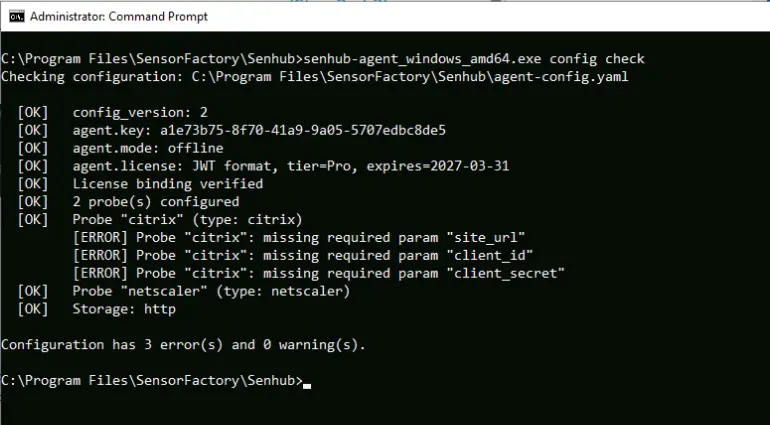
config check
Validates a configuration file and reports errors and warnings.
senhub-agent config check
senhub-agent config check /path/to/agent-config.yaml
senhub-agent config check --json
Exit code 0 means no finding, 1 warnings only, 2 an error or a file that cannot be read. With --json every status line of the report becomes an entry of findings.
Checks performed:
- YAML syntax (with line-level error context)
- Required fields (config_version, agent.key)
- License validity and agent binding
- Probe types against the registry
- Required probe parameters (endpoint, credentials)
- Storage strategy names
Fragments under probes.d/ and strategies.d/ are covered when a multi-file layout is present.
config show
Prints the merged and resolved configuration as YAML. Secret handling depends on the flag:
senhub-agent config show
senhub-agent config show --raw
senhub-agent config show --resolved
senhub-agent config show /path/to/agent.yaml
senhub-agent config show --json
| Flag | Description |
|---|---|
--redact |
Substitute ${env:} / ${file:} / ${secret:} references but mask secret values (default) |
--resolved |
Substitute all references, printing secret values in cleartext |
--raw |
Leave references exactly as written in the file |
--json |
Print the configuration inside one JSON object (see JSON output); the redaction mode applies as in text |
An optional trailing path selects a config file other than the OS default.
config migrate
Converts a legacy monolithic agent-config.yaml into the multi-file layout (agent.yaml + probes.d/ + strategies.d/), writing a timestamped backup of the original. It is idempotent: a config that is already multi-file reports nothing to do and exits 0.
debug-modules-list
Lists all available debug filter names.
Secret Store
The secret command manages the OS-native secret store that backs ${secret:NAME} references in the configuration, so that passwords and tokens never sit in plaintext in agent.yaml, probes.d/*.yaml or strategies.d/*.yaml. See the Secret Store guide for the backends and the full workflow.
A secret value is never passed on the command line — it would leak through the process list and shell history. secret set reads the value from a hidden terminal prompt, from stdin, or from a file via --from-file.
| Command | Description |
|---|---|
secret set <name> |
Store or replace a secret (hidden prompt, stdin, or --from-file <path>) |
secret get <name> |
Print a secret value to stdout (a deliberate reveal) |
secret list |
List secret names (never values) |
secret rm <name> |
Delete a secret (prompts to confirm; --yes to skip) |
secret status |
Show the active backend and store location (--json for a JSON object) |
secret migrate |
Move inline plaintext secrets from the config into the store (--wire-unit also wires the systemd-creds drop-in) |
secret wire-unit |
Regenerate the systemd unit credential drop-in (Linux/systemd-creds only) |
sudo /usr/local/bin/senhub-agent secret set veeam_password          # hidden prompt
sudo /usr/local/bin/senhub-agent secret set veeam_password --from-file /root/veeam.pw
printf '%s' "$PW" | sudo /usr/local/bin/senhub-agent secret set veeam_password
sudo /usr/local/bin/senhub-agent secret list
sudo /usr/local/bin/senhub-agent secret status
On Linux the backend is chosen automatically (see the Secret Store guide). SENHUB_SECRET_BACKEND=age or SENHUB_SECRET_BACKEND=systemd-creds forces one, for example sudo SENHUB_SECRET_BACKEND=systemd-creds /usr/local/bin/senhub-agent secret migrate --wire-unit.
Once stored, reference the secret from the configuration as ${secret:veeam_password}.
Agent key
sudo /usr/local/bin/senhub-agent key show
sudo /usr/local/bin/senhub-agent key show --config-path /etc/senhub-agent/agent.yaml
Prints the configured agent key: the key PRTG, Nagios and a Prometheus scrape read the agent with. It does not open the web console or the administration API, which answer only the administration key; open the console with senhub-agent console. It resolves the key whether it is still inline in the config or has been sealed into the store as ${secret:agent.key}. Because it reveals a sealed value, the command runs behind the same privilege gate as the service commands.
sudo /usr/local/bin/senhub-agent key instance-id
sudo /usr/local/bin/senhub-agent key instance-id --config-path /etc/senhub-agent/agent.yaml
Prints the agent's instance id: the service.instance.id its telemetry and its topology entity carry, an RFC 4122 UUID derived from the agent key. Use it to find this agent in a metrics store or in a topology graph. It is not a credential; senhub-agent status, the Identity card of the console's Settings page and the Agent card of its Overview show it too.
Database Helpers
db-monitoring init
Generates the least-privilege SQL needed to provision a monitoring user for the database probes. The command never connects to a database — it prints the GRANT block to stdout for a DBA to review and run. It requires no license tier, and no administrator privileges on Windows.
senhub-agent db-monitoring init --engine postgresql
senhub-agent db-monitoring init --engine mysql --user mon_user --host 10.0.0.5
| Flag | Description |
|---|---|
--engine NAME |
mysql, mariadb, or postgresql (required) |
--user NAME |
Monitoring user to create (default: senhub_monitor) |
--host HOST |
Source host for the MySQL grant (default: %, all hosts) |
--version N |
Major engine version, to gate version-specific grants (optional) |
Update
Check for updates
Checks if a newer version is available and displays it.
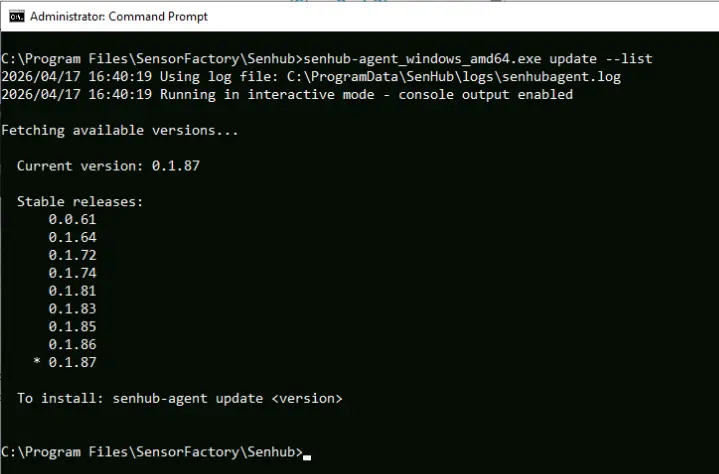
List available versions
Lists all stable versions. If auto_update.include_beta: true is set in the configuration, beta versions are also listed.
Install a specific version
sudo /usr/local/bin/senhub-agent update 0.6.0
sudo /usr/local/bin/senhub-agent update 0.6.0 --dry-run
sudo /usr/local/bin/senhub-agent update 0.6.0 --registry-url https://releases.example.com
Downloads and installs the specified version. On Linux, when the systemd service is running, it is then restarted and the command checks that the new process runs the binary just installed, printing the version it runs; if it does not, the command fails. Updating replaces the binary and needs the same privileges as the service commands. On Windows, the MSI restarts the service itself.
| Flag | Description |
|---|---|
--dry-run, -d |
Do not install; print the version that would be installed |
--registry-url URL |
Release registry to download from, instead of the built-in one |
--no-restart |
Install the binary and leave the running service as it is, for a script that restarts it itself. Until the service restarts it keeps running the previous version, whatever senhub-agent version says: that command reads the file on disk |
--verbose, -v |
Enable verbose logging |
Zabbix
zabbix setup
Prepares a Zabbix server for the agent in one call: it imports the generated templates, creates the host group, and creates the autoregistration action that turns an agent's first contact into a host carrying them. After it, a machine needs the agent and two lines naming the server, with nothing typed in the Zabbix interface.
It is an administrator command, run once. A deployed agent never holds an API token and still registers by itself. Every step is idempotent, so re-running it is safe and is also how a template is refreshed after an upgrade.
senhub-agent zabbix setup --url https://zabbix.example.com --token-file ~/.zbx-token
senhub-agent zabbix setup --url https://zabbix.example.com --token-file ~/.zbx-token \
  --probe cpu --probe memory --probe veeam --group "SenHub agents"
senhub-agent zabbix setup --url https://zabbix.example.com --dry-run
| Flag | Description |
|---|---|
--url URL |
Zabbix frontend, required. The agent pushes to the trapper port, not this one |
--token-file PATH |
File holding the API token. Preferred: a token on the command line is visible to every process on the machine |
--token VALUE |
API token. Read after --token-file and before SENHUB_ZABBIX_TOKEN |
--probe TYPE |
Probe whose template is linked to every host that registers. Repeatable. Without it, the probes every machine runs: cpu, memory, network, logicaldisk, process |
--group NAME |
Host group the registering hosts join |
--metadata STRING |
Host metadata the autoregistration action matches on; must equal the agent's host_metadata |
--action-name NAME |
Name of the autoregistration action it writes |
--discovery-delay INTERVAL |
Update interval of the discovery rules, which Zabbix sets to one hour by default |
--no-discovery-delay |
Leave the discovery rules as the template declares them |
--prefix PREFIX |
First segment of the item keys; must match the output's key_prefix |
--version 6.0\|7.0 |
Export format of the templates written |
--dry-run |
Describe what it would do and change nothing. Works without a token |
The token is read from --token-file, then --token, then the
environment variable SENHUB_ZABBIX_TOKEN.
setup also names any other enabled autoregistration action a
registering agent would match. Zabbix runs every matching action, and
two that both link templates do not merge: the second link fails,
because Zabbix refuses two linked templates declaring one key, and it
fails silently. The host then comes up with whichever set won and items
that never fill. setup reports it rather than disabling it, since an
action you wrote may do things it knows nothing about.
Every template is imported, including the probes not named with
--probe; only the linking is narrowed. A template linked to a host
whose agent does not run that probe adds discovery rules that never
answer, which is why the default is the universal set.
zabbix template
Writes the Zabbix templates generated from the probe definitions, one file per probe type, without touching a server. Use it to read what will be imported, to keep the templates under version control, or to import them by a route of your own.
senhub-agent zabbix template --out ./templates
senhub-agent zabbix template --probe memory --platform linux
senhub-agent zabbix template --probe veeam --version 6.0
| Flag | Description |
|---|---|
--probe TYPE |
Probe type to generate. Repeatable. Without it, every definition |
--platform linux\|windows |
Keep only the metrics that platform can produce. Without it, the definition whole |
--version 6.0\|7.0 |
Export format, 7.0 by default |
--prefix PREFIX |
First segment of the item keys; must match the output's key_prefix |
--delay INTERVAL |
Update interval of the item prototypes |
--out DIR |
Directory to write into. Without it, and with a single --probe, the template goes to standard output |
With --out, a small SenHub Agent template is written beside the
others, carrying the agent's own items. Link it on every host: it is
what turns the host's availability green.
License
Show license status
Print the agent key for a licence
Prints this agent's key, the value to give Sensor Factory when a licence is ordered for this agent, and the value license activate checks the licence binding against.
Activate a license
sudo /usr/local/bin/senhub-agent license activate - < license.jwt
cat license.jwt | sudo /usr/local/bin/senhub-agent license activate -
sudo /usr/local/bin/senhub-agent license activate <license-jwt>
With -, or with no argument and a file or pipe on standard input, the
token is read from standard input and never appears in the process list
or the shell history. Validates the license and writes it to the license.jwt file next to
agent.yaml. Restart the agent for the change to take effect. You can also
simply place the license.jwt file next to the config yourself and restart —
no CLI needed.
Remove license
sudo /usr/local/bin/senhub-agent license remove
sudo /usr/local/bin/senhub-agent license remove --force
Reverts to the free tier: deletes license.jwt and clears any inline license. The command prompts for confirmation before writing; pass --force (-f) to skip the prompt for unattended runs. Restart the agent for the change to take effect.
Other
| Command | Description |
|---|---|
version |
Show agent version and build information (--json for a JSON object) |